


Build your own wireless Bluetooth Air Mouse with this ESP32-based DIY kit. The project uses an ESP32-C3 and MPU6050 motion sensor to translate hand movements into mouse cursor movement, allowing you to control a computer without a traditional mouse.
The kit is ideal for electronics enthusiasts, students, makers, and DIY project builders who want to learn about ESP32, Bluetooth HID, sensors, and motion-based control.
Key Features
- ESP32-C3 based wireless air mouse
- MPU6050 6-axis motion sensor
- Bluetooth HID mouse functionality
- Motion-controlled cursor
- Dedicated left and right mouse buttons
- Portable and cable-free operation
- Great educational electronics project
- Suitable for Arduino/ESP32 programming practice
How It Works:
Move the assembled device in your hand and the MPU6050 detects the rotational movement. The ESP32 processes the sensor data and sends the corresponding cursor commands to your computer over Bluetooth.
Perfect For: DIY electronics projects, ESP32 learning, Arduino projects, Bluetooth HID experiments, STEM education, and makers.
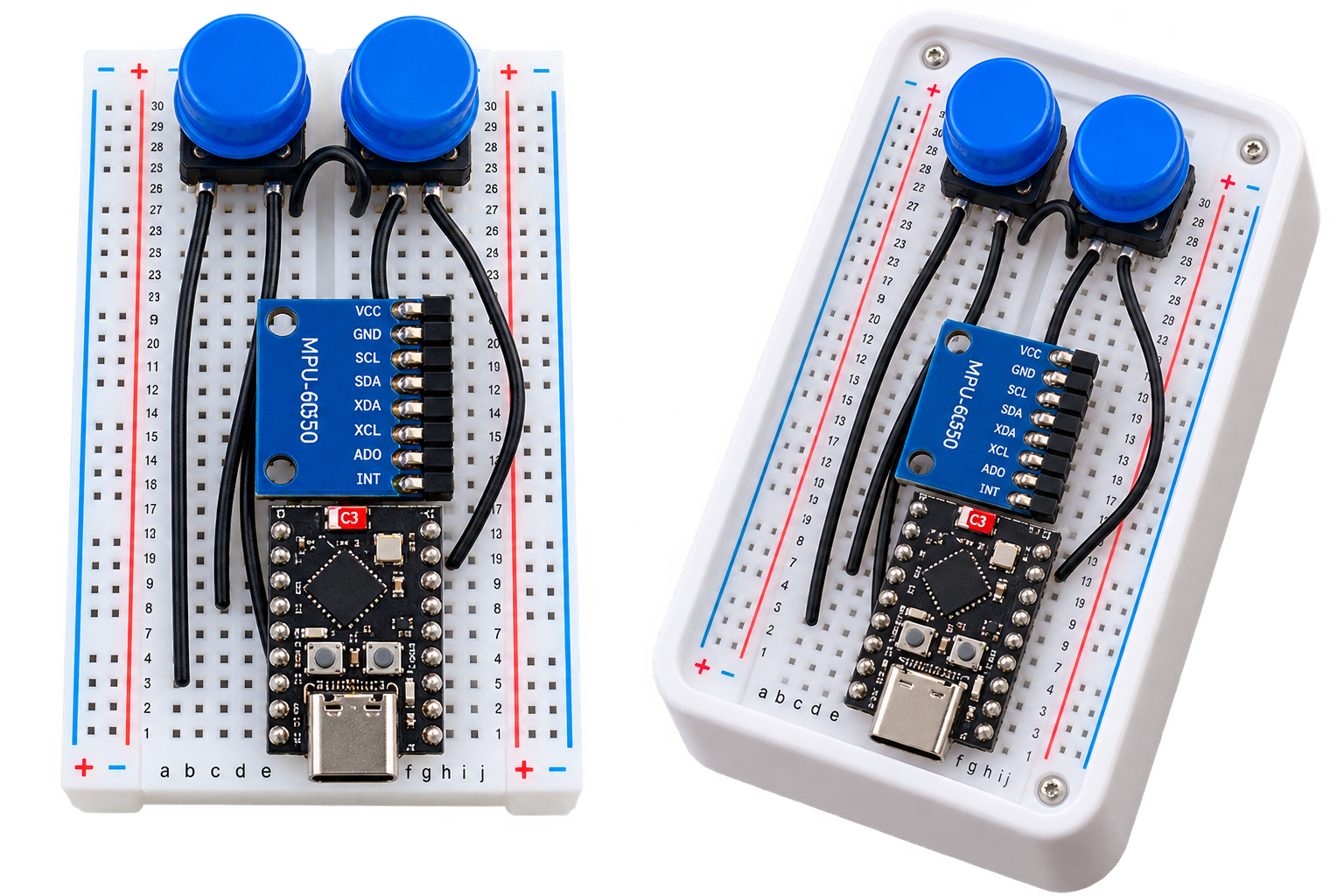
Make it by following helping materials :
Wirring
| MPU6050 | ESP32-C3 |
|---|---|
| VCC | 3.3V |
| GND | GND |
| SDA | GPIO 8 |
| SCL | GPIO 9 |
| Button | ESP32-C3 |
|---|---|
| Left | GPIO 3 |
| Right | GPIO 10 |
Libraries Used
Arduino · C++
#include <Wire.h>
#include <HijelHID_BLEMouse.h>
Purpose of Library
#include <Wire.h> → Handles I2C communication with MPU6050.
#include <HijelHID_BLEMouse.h> → Enables ESP32 to act as a BLE mouse.
CODE:
#include <Wire.h>
#include <HijelHID_BLEMouse.h>

#define MPU_ADDR 0x68
#define LEFT_BTN 3
#define RIGHT_BTN 10

#define MOUSE_LEFT MouseButton::Left
#define MOUSE_RIGHT MouseButton::Right

HijelBLEMouse mouse("MPU_Mouse", "Hijel");

int16_t gx, gy, gz;

float smoothed_dx = 0;
float smoothed_dy = 0;

unsigned long lastPrint = 0;

void setup() {
    Serial.begin(115200);

    Wire.begin(8, 9);

    pinMode(LEFT_BTN, INPUT_PULLUP);
    pinMode(RIGHT_BTN, INPUT_PULLUP);

    Wire.beginTransmission(MPU_ADDR);
    Wire.write(0x6B);
    Wire.write(0);
    Wire.endTransmission();

    mouse.setBatteryLevel(100);
    mouse.begin();

    Serial.println("INIT DONE");
}

void loop() {

    if (!mouse.isPaired()) {
        if (millis() - lastPrint > 1000) {
            Serial.println("BLE NOT PAIRED");
            lastPrint = millis();
        }
        delay(100);
        return;
    }

    if (millis() - lastPrint > 1000) {
        Serial.println("BLE CONNECTED");
        lastPrint = millis();
    }

    bool leftPressed = (digitalRead(LEFT_BTN) == LOW);
    bool rightPressed = (digitalRead(RIGHT_BTN) == LOW);

    if (leftPressed)
        mouse.press(MOUSE_LEFT);
    else
        mouse.release(MOUSE_LEFT);

    if (rightPressed)
        mouse.press(MOUSE_RIGHT);
    else
        mouse.release(MOUSE_RIGHT);

    Wire.beginTransmission(MPU_ADDR);
    Wire.write(0x43);
    Wire.endTransmission(false);
    Wire.requestFrom(MPU_ADDR, 6);

    if (Wire.available() == 6) {
        gx = Wire.read() << 8 | Wire.read();
        gy = Wire.read() << 8 | Wire.read();
        gz = Wire.read() << 8 | Wire.read();
    } else {
        Serial.println("MPU READ ERROR");
        return;
    }

    float sensitivity = 0.003;

    float dx = -gy * sensitivity;
    float dy = -gx * sensitivity;

    if (abs(dx) < 0.5) dx = 0;
    if (abs(dy) < 0.5) dy = 0;

    smoothed_dx = smoothed_dx * 0.7 + dx * 0.3;
    smoothed_dy = smoothed_dy * 0.7 + dy * 0.3;

    int move_x = constrain((int)smoothed_dx, -20, 20);
    int move_y = constrain((int)smoothed_dy, -20, 20);

    mouse.move(move_x, move_y);

    if (millis() - lastPrint > 200) {
        Serial.print("GX: "); Serial.print(gx);
        Serial.print(" GY: "); Serial.print(gy);
        Serial.print(" DX: "); Serial.print(dx);
        Serial.print(" DY: "); Serial.print(dy);
        Serial.print(" MX: "); Serial.print(move_x);
        Serial.print(" MY: "); Serial.print(move_y);
        Serial.print(" L: "); Serial.print(leftPressed);
        Serial.print(" R: "); Serial.println(rightPressed);
        lastPrint = millis();
    }

    delay(10);
}



Reviews
There are no reviews yet.